
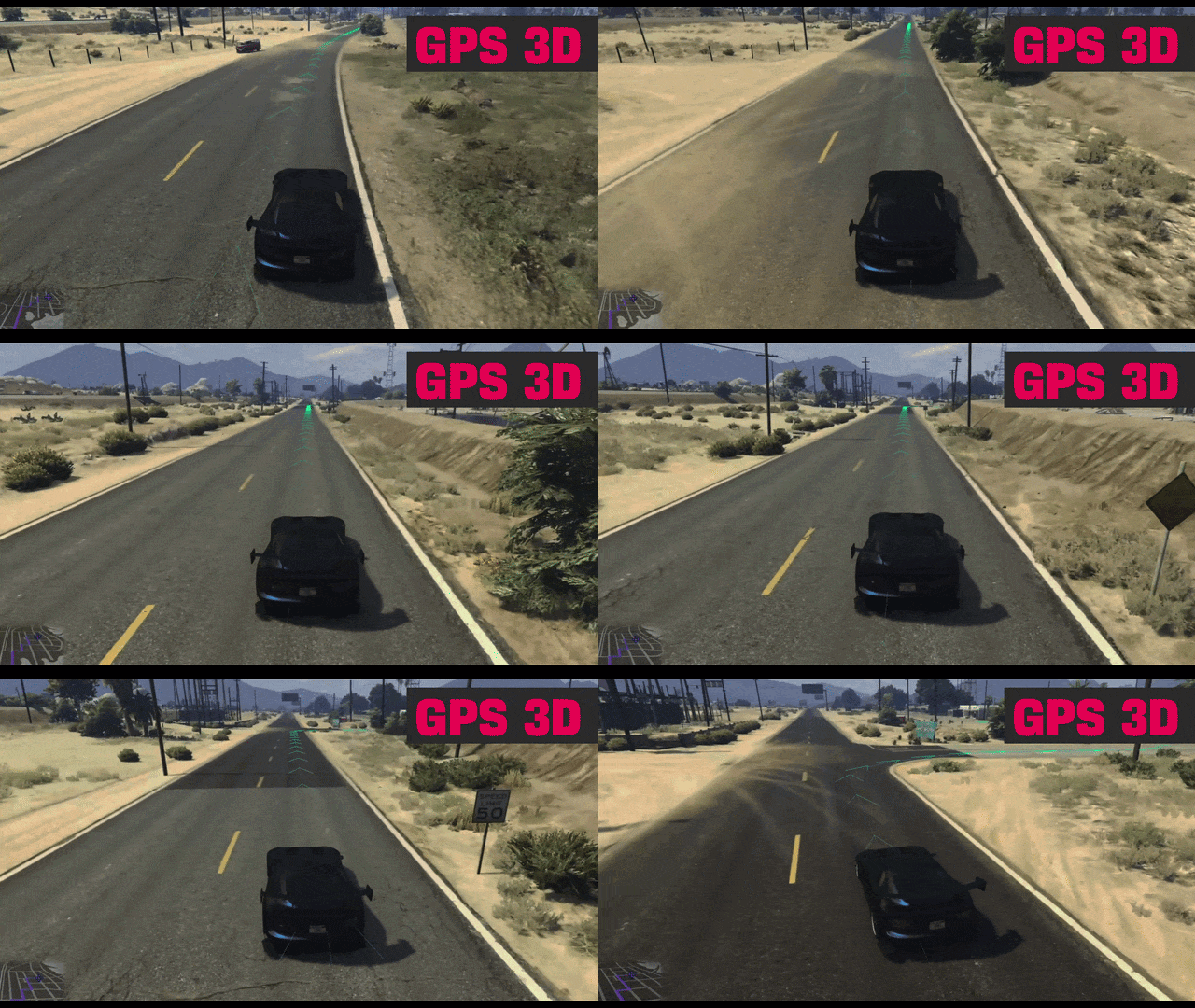

The 3D GPS Route Renderer for FiveM adds an advanced visual navigation layer by drawing a live three-dimensional route directly above roads using GTA and FiveM natives. Instead of relying only on the standard minimap GPS, players can follow an immersive route trail complete with directional chevrons and customizable rendering styles.
This script is designed as a visual prototype for improved navigation, offering route sampling, junction handling, manual refresh controls, and multiple rendering modes for modern FiveM servers.
Features Overview
| Feature | Details |
|---|---|
| Active GPS Route Reading | Reads the current in-game GPS route automatically |
| 3D Route Trail | Draws route paths above roads in real time |
| Directional Chevrons | Displays directional markers along the route |
| Junction Handling | Includes first-pass support for turns and curve continuity |
| Manual Refresh | Rebuild current route on command |
| Color Customization | Supports custom RGBA route colors |
| Multiple Render Types | Line mode or Rect + UV map mode |
| Debug Tool | Ground and Z-axis testing for clipping behavior |
Available Commands
| Command | Function |
|---|---|
| /gps3d | Toggle the 3D GPS system |
| /gps3d_refresh | Rebuild the current route |
| /gps3dcolor r,g,b,a | Change route color |
| /gps3dtype 1 or 2 | Switch rendering mode |
| /gps3ddebug | Enable debug testing tool |
Configuration Options
| Setting | Purpose |
|---|---|
| updateInterval = 2500 | Default update speed |
| 250 or 500 | Faster updates for high-speed driving |
| Junction Filtering | Reduce route clutter at intersections |
How It Works
The system reads GTA/FiveM’s existing route calculations, samples position points, and projects a 3D visual route above roads. Players continue using normal map waypoints while gaining a much more immersive visual guidance layer.
Installation
- Place l2k_gps3d in your resources folder.
- Add ensure l2k_gps3d to your server.cfg.
- Start the server.
- Set a waypoint on the map.
- Use /gps3d to activate the renderer.
Benefits for Roleplay Servers
| Benefit | Impact |
|---|---|
| Better Navigation | Easier route following for players |
| Increased Immersion | Modern 3D route visuals |
| Customizable Experience | Colors and render styles can be adjusted |
| Improved Driving RP | Useful for patrol, trucking, and civilian driving |
Important Notes
This is a visual prototype and not a replacement for the default minimap GPS. It uses GTA/FiveM’s existing calculated route while adding an enhanced visual layer. Some turns may still show visual artifacts and may need refinement.
For more FiveM scripts, tutorials, and server tips, visit our website and join our community of server owners and developers. Let’s build the ultimate roleplay experience together!


Reviews
There are no reviews yet.